Oops, Git!
How to recover from common mistakes
Maëlle Salmon https://oops-git.netlify.app/
What is Git?
Git is a Version Control System (VCS).
What is Git?
This makes Git more like a mini filesystem with some incredibly powerful tools built on top of it, rather than simply a VCS [version control system].
Why Git?
after you commit a snapshot into Git, it is very difficult to lose, especially if you regularly push your database to another repository.
Also
📜 History to use
🌳 Branches
Actually…
Sometimes it hurts. 😱
Can you share ugly things that happened to you with Git?
Actually…
Sometimes it hurts. 😱
- Push of secret data (API key for example).
- Push of heavy data
- Commits that embarrass us
- Commits in the wrong branches
- …
Our objectives today
💪 Prevent some problems
💪 Practice how to successfully get out of some horrible situations.
How we are going to work
In your usual Git environment.
Can you write how you use Git? Me: Positron+terminal sometimes.
RStudio
Show where Git is, the R console, the terminal.
Positron
Show where Git is, the R console, the terminal.
Other IDE
Do you dare to share?
Prevention: usethis::git_sitrep()
Prevention: knowing where you are
👀 Staging area
👀 Branch
👀 Remote (GitHub?) vs local (your computer)
How we are going to work
In temporary folders created by saperlipopette.
So we don’t break our important projects.
{saperlipopette}
A tool for using Git
An R package for creating exercises in your own folders.
saperlipopette
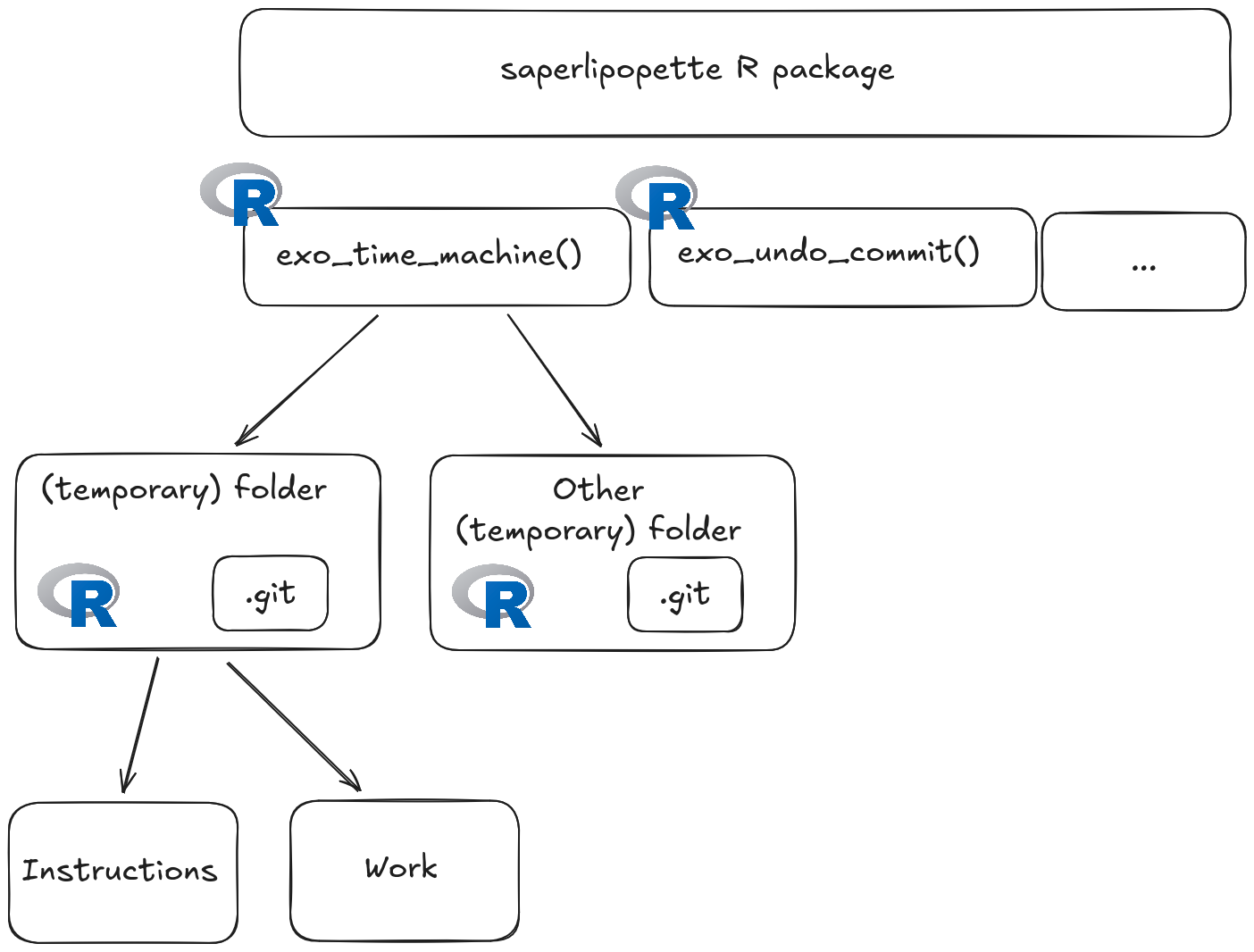
saperlipopette: R for creating Git exercises
R to create the exercise in another folder.
R in the new session to read the instructions.
Your usual tools to solve the Git problem!
saperlipopette: how to use the package
Call a function from an R session.
Go to the created folder (seen in the output).
Open R in this folder, read the instructions.
Work with your Git tools or the terminal.
Close the exercise session.
Let’s practice horrible situations!
I will make demos and then you will do them too.
My last commit is embarrassing 1/2
My last commit is embarrassing 2/2
See also saperlipopette::exo_check_editor().
My last commit is embarrassing
15 minutes to solve these exercises. 😈
Break (5 minutes) ☕
My changes were wrong 1/2
My changes were wrong 2/2
My changes were wrong
15 minutes to solve these exercises. 😈
I committed on the wrong branch 1/2
I committed to the wrong branch 2/2
I committed to the wrong branch
15 minutes to solve these exercises. 😈
Break (5 minutes) 🍵
I did something horrible with rebase -i or some other barbarism
Solve it yourself in 10 minutes.
Prevention again
✨ .gitignore ✨
Demo
I create
secret-folder/.I see it in the staging area.
I add
secret-folderto my.gitignore.I don’t see it in the staging area anymore.
Vaccine
usethis::git_vaccinate()
What if I made a push of my mistake?
🚀 git push -f
But
🔥 not in shared branches
🔥 does not completely remove the old commit on GitHub https://github.com/ropensci-training/saperlipopette/pull/26
Conclusion
How to suffer less with Git?
Preventing problems: know where you are, use .gitignore (, don’t use Vim).
Learning how to get out of horrible situations.
Other situations we did not see
- https://happygitwithr.com/push-rejected
- conflicts
- https://happygitwithr.com/pull-tricky
- Athanasia Mo Mowinckel’s “Too much git cleaning”
Thank you! 💙 Thanks to Dariia Mykhailyshyna and Yanina Bellini Saibene.
Git Resources: in English
Git resources: General books
Book Git in Practice by Mike McQuaid (reading notes)
Book Pro Git by Scott Chacon (reading notes)
Git resources: R
“What they forgot to teach you about R”. now (E. David Aja) and then (Jenny Bryan, Shannon Pileggi).
Happy Git and GitHub for the useR by Jenny Bryan, the STAT 545 TAs, Jim Hester.
Git resources: others
Julia Evans’ zines “Oh shit, Git!” and “How Git works”